

Custom Software vs Off-the-Shelf Tools for Digital Transformation
Learn when custom software wins and when off-the-shelf tools are better for digital transformation, cost, maintenance, CRM, ERP, and ecosystem fit.
DIGITAL TRANSFORMATION
Key Points
Off-the-shelf tools are often the best choice for standard business processes because they are faster to deploy and easier to maintain.
Custom software is most valuable when a business has unique workflows, approval processes, or operational requirements.
CRM systems can often be implemented successfully using platforms like HubSpot without extensive customization.
ERP decisions require deeper evaluation because finance, operations, inventory, and approvals are usually more complex and business-specific.
Companies can reduce costs and improve adoption by building solutions within ecosystems they already use, such as Microsoft or Google.
Software costs go beyond implementation and include maintenance, updates, integrations, training, and technical debt over time.
Actionable takeaway: Evaluate each business process individually and choose custom software only when it creates clear operational value that standard tools cannot deliver.
What is the difference between custom software and off-the-shelf tools?
Choosing between custom software and off-the-shelf tools is not about which option sounds more advanced. It is about which option fits the work.
Off-the-shelf tools are built for many companies. Custom software is built for one company. One gives you speed and a proven structure. The other gives you control and a better fit.
This matters because digital transformation is not just about buying software. It is about changing how the business works. If the tool matches the process, teams move faster. If the tool fights the process, people work around it, and the system becomes harder to trust and harder to use.
Harvard Business Review has noted that companies often face a tradeoff between faster deployment and closer business fit when they choose between ready-made tools and custom development. That is why this decision should be made around business need, not around software trends.
What does build vs buy mean in simple terms?
Build means you create a system for your own business. Buy means you use a system already built by a vendor.
Build gives more control. Buy gives more speed. The right answer depends on how unique the process is.
Why does this choice matter in digital transformation?
Because digital transformation is not only about digitizing old work. It is about improving how work happens. The software should support that change, not create new friction.
When is an off-the-shelf tool the better choice?
An off-the-shelf tool is usually the better choice when the process is standard and widely understood. It is also a strong option when speed matters more than perfect fit, or when the company wants to avoid a long build cycle.
A CRM is a good example. Many businesses do not need a fully custom CRM because the core work is already clear. HubSpot lets teams create custom objects, manage records, and shape the CRM around the business without rebuilding the entire platform. That means many teams can adapt the tool without turning the CRM into a software project.
That is why a tool like HubSpot can be a good fit for many teams. The business gets structure, reporting, and speed without carrying the cost of a full custom build.
Off-the-shelf tools also make sense when the company already lives inside a strong ecosystem. Microsoft says Power Platform can be used to build apps, automate workflows, analyze data, and create websites in one environment. Microsoft also says Power Apps and Power Automate can connect data sources and speed up development across everyday business tools.
That matters because ecosystem fit reduces friction. If the team already uses Microsoft 365, the solution can sit closer to the tools people already trust. Less switching. Less training. Less confusion. More adoption.
When is the process standard?
When the business process looks like what many other companies already do. Lead tracking, task management, document sharing, and standard sales pipelines often fall into this group.
When does speed matter more than perfect fit?
When the company needs to launch quickly, test an idea, or reduce implementation risk. In these cases, a ready-made system is often the smarter path.
When does an existing ecosystem already solve the problem?
When the business already has the people, permissions, data, and workflows inside Microsoft or Google. In that case, extending the ecosystem may be easier than adding a new platform.
When does custom software make more sense?
Custom software makes more sense when the workflow is unique. It also makes sense when the system itself is part of the business advantage.
A budget control system is a strong example. If a company needs custom approval chains, department budgets, role-based permissions, unique reporting, or real-time control across teams, a custom system can be the better choice. A standard tool may handle parts of the process, but it may not reflect the business rules closely enough.
Custom software is also useful when the process is central to how the company competes. If the workflow helps the business move faster, reduce errors, or control money better than competitors, then the software should be designed around that workflow instead of forcing the team into a generic pattern.
This is where a custom ERP can be worth the investment. SAP says cloud ERP is now the most popular ERP deployment method and highlights lower upfront costs, greater scalability, faster innovation, and easier integration. SAP also says the provider handles maintenance, updates, and security on the business’s behalf.
Oracle takes a similar position. Oracle describes its cloud ERP as a system that uses built-in AI to predict, detect, and act on new situations, while also automating manual business processes.
That is why some businesses should buy an ERP and configure it, while others should invest in something more customized. If the process is standard, a platform is often enough. If the process is unique, the business may need a custom layer, custom modules, or a fully custom ERP environment.
When is the workflow unique?
When the process has special rules, special approvals, or special reporting that standard tools cannot handle cleanly.
When is the system part of the business advantage?
When the way the company works is tied to speed, accuracy, margin, compliance, or customer experience.
When do control and rules matter more than convenience?
When the business needs strong governance, detailed permissions, or a system that mirrors internal processes exactly.
How should teams think about CRM and ERP differently?
CRM and ERP should not be treated the same way.
CRM is usually easier to standardize because many companies need the same basic structure. They want to track leads, opportunities, activities, and customer data. For that reason, many businesses can do well with tools like HubSpot, especially when they only need a modest amount of customization. HubSpot’s custom object support makes it possible to shape the CRM around the business without turning it into a full software project.
ERP is different because it sits closer to the core of the business. Finance, supply chain, procurement, inventory, and approvals often depend on internal rules that are harder to standardize. That is why ERP selection should focus more on process fit, control, and long-term maintainability.
Odoo is a useful example of a flexible middle ground. Odoo’s documentation says modules can add brand new business logic or alter and extend existing logic. It also says everything in Odoo starts and ends with modules.
That makes Odoo attractive for companies that want flexibility without starting from zero. It is not the same as a fully custom system, but it is also not a rigid one-size-fits-all platform.
Why do many CRMs not need deep customization?
Because the core CRM job is often the same across businesses. A standard structure is often enough to manage leads, deals, and customer history.
When does a custom ERP system make sense?
When the company’s control structure, approvals, finance logic, or operations are too specific for a standard package.
Where do HubSpot, SAP, Oracle, Odoo, and Microsoft fit?
HubSpot is strong for standard CRM needs, SAP and Oracle are strong for broad ERP environments, Odoo offers flexible modularity, and Microsoft is useful when the company already lives in that ecosystem.
How do Microsoft and Google ecosystems affect the decision?
Ecosystem choice can be just as important as the tool itself. A system that fits the ecosystem the team already uses is often easier to adopt, easier to connect, and easier to maintain.
The Microsoft ecosystem is strong when a company already depends on Microsoft 365, Power BI, SharePoint, Teams, and related tools. Microsoft says Power Platform lets businesses analyze data, build custom apps, automate workflows, and create websites in the same environment. Microsoft also says Power Apps and Power Automate can connect data sources and automate work across everyday business tools.
Google is similar in its own ecosystem. Google says Apps Script is a low-code platform that helps businesses integrate, automate, and extend Google Workspace. Google also says Workspace can be integrated, customized, and extended through developer tools, and that AppSheet and Apps Script can build business apps, workflows, and automations.
The key lesson is simple. If a company already lives inside Microsoft or Google, the best move may not be to buy a separate platform. The best move may be to extend the ecosystem it already uses.
Why does ecosystem fit reduce friction?
Because people already know the tools, the data can move more easily, and teams do not need to learn a completely new environment.
What can the Microsoft ecosystem do well?
It can connect apps, automate work, handle data, and support custom business processes inside one familiar stack.
What can the Google ecosystem do well?
It can support lightweight app building, automation, workflow improvement, and collaboration inside Google Workspace.
What do cost and maintenance really look like?
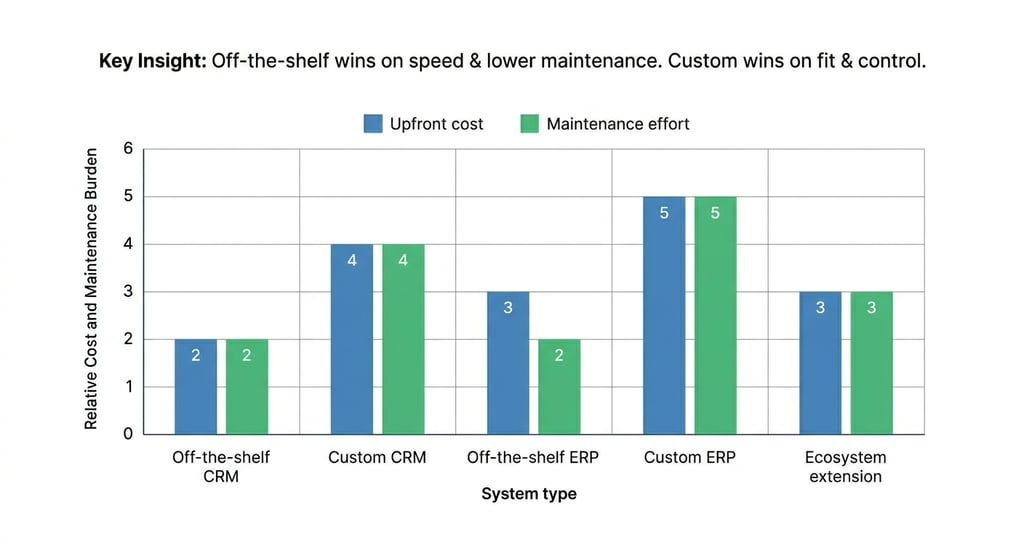
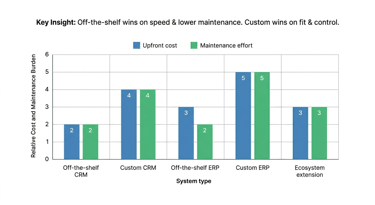
Cost is not just the price of the first launch. It is also the cost of updates, support, training, bug fixes, and changes over time. That is where many software decisions become expensive.
McKinsey reported that CIOs estimated tech debt accounts for 20 to 40 percent of the value of their entire technology estate before depreciation. The same research found that 10 to 20 percent of the technology budget for new products can be diverted to fixing tech debt. That means software decisions have a long tail, and the hidden cost often shows up later.
This is one reason off-the-shelf and cloud platforms are attractive. SAP says cloud ERP lowers upfront costs because there is no hardware or software purchase cost, and it also lowers ongoing IT and staff costs because upgrades and maintenance are handled by the provider. SAP makes a similar case in its cloud ERP guide, where it says the provider handles maintenance, updates, and security.
Custom software, by contrast, needs ownership. That is not a bad thing, but it is a real thing. Oracle notes that customizations typically need to be maintained by IT, which means the business takes on more long-term responsibility.
That is why over-customization can be expensive. Every extra feature adds maintenance work. Every special rule adds future support. Every unique integration adds more places where problems can appear. In many cases, a slightly less perfect system is smarter than a deeply customized system that becomes hard to manage.
Why is upfront cost only part of the picture?
Because a cheaper launch can become an expensive system later if updates, fixes, and support become difficult.
Why do updates and technical debt matter?
Because software that is hard to change slows down the business and drains future budgets.
When can over-customization become expensive?
When the company keeps adding one-off features instead of designing a system that can be maintained cleanly.
What is the best way to decide?
The best way to decide is to ask five simple questions.
First, is the process standard or unique? If it is standard, an off-the-shelf tool is often enough. If it is unique, custom software may be worth it.
Second, is speed more important than perfect fit? If the company needs something live quickly, a mature platform usually wins.
Third, is the system close to the company’s core advantage? If yes, then it deserves more customization.
Fourth, does the company already have a strong ecosystem in Microsoft or Google? If yes, extending that stack may be the most efficient choice.
Fifth, can the team support the system after launch? If the answer is no, then the project is probably too custom.
There is also a hybrid option. Many companies do not need a fully custom system or a fully standard one. They need a standard base with custom workflows, custom reporting, or custom integrations on top. That often gives the best balance of fit, speed, and cost control.
Which questions should you ask before you build or buy?
Ask whether the process is standard, whether the business needs speed, whether the tool fits the ecosystem, whether the workflow is core to the business, and whether the team can maintain it.
When is a hybrid approach the smartest path?
When the company wants the structure of a proven platform, but still needs custom rules, reports, or automations on top of it.
Why does Exology’s perspective matter here?
Exology has delivered more than 200 projects for more than 150 businesses across 20+ countries and 10+ key industries. That matters because this build vs buy question looks different in every company. A CRM might be fine as a standard tool in one business, but a budget system or an operational workflow might need custom logic in another.
Experience across many projects helps reveal a pattern. The right answer is rarely “custom everything” or “buy everything.” The right answer is usually to choose the system that fits the process, the team, and the budget.
What does experience across projects reveal?
It shows that businesses do better when software supports the way they actually work. It also shows that standard platforms are great when the process is common, while custom systems are better when the process is strategic, unique, or tightly controlled.
How Exology Helps
We help businesses decide when a standard platform is enough and when a custom system will create more value.
We connect data across systems, so teams can see one clear view instead of working from disconnected tools.
We build dashboards and reporting layers that make standard software more useful for decision-making.
We develop custom systems for processes that need tighter control, cleaner structure, or business-specific rules.
We automate repetitive work so teams spend less time on manual reporting, updates, and handoffs.
We design solutions that fit the ecosystem a business already uses, whether that is Microsoft, Google, or a custom stack built around the workflow.
Read More
Contact us
Whether you have a request, a query, or want to work with us, use the form below to get in touch with our team.