

Enterprise AI Agents Explained Simply
Learn what enterprise AI agents are, why businesses need them, how they work, and where they create real value across teams.
AI & AUTOMATION
Key Points
Enterprise AI agents can understand requests, access business systems, and complete tasks across workflows
Unlike traditional chatbots, enterprise AI agents can take actions, automate processes, and support real business operations
Businesses use AI agents to reduce repetitive work, improve response times, and connect disconnected systems
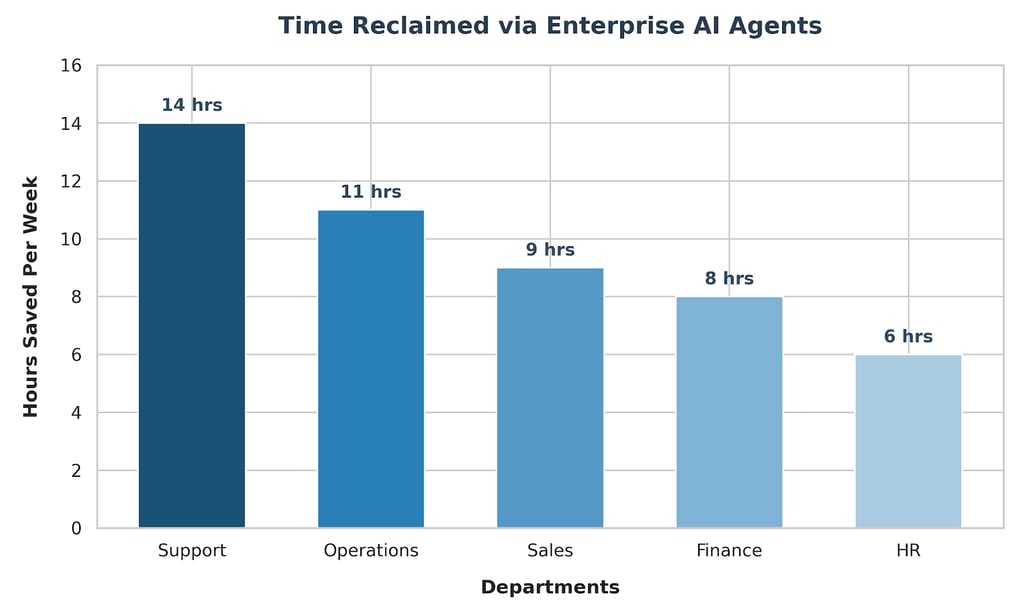
Common enterprise AI agent use cases include customer support, internal knowledge search, sales assistance, reporting, and HR support
Clean and connected data is critical because poor data quality can reduce AI accuracy and reliability
Successful AI agent adoption depends on strong workflows, secure integrations, human oversight, and employee training
Actionable takeaway: Start with one repetitive workflow, connect the right business systems, and build your AI agent on reliable data foundations first
What Are Enterprise AI Agents?
Enterprise AI agents are AI systems that do more than answer questions. They can understand a request, pull information from business systems, follow a workflow, and complete a task with some level of autonomy.
That is what makes them different from a normal chatbot. A chatbot usually responds to a prompt. An enterprise AI agent can act on it. It can look up records, summarize data, trigger steps, and support decisions across the business.
This matters because work in large companies is usually spread across many systems. Teams use CRMs, ERPs, dashboards, shared drives, emails, spreadsheets, and internal tools every day. An enterprise AI agent helps connect those pieces so employees do not waste time moving between tools.
The business case is strong. McKinsey estimated that generative AI could add $2.6 trillion to $4.4 trillion annually across the use cases it studied. A large share of that value comes from customer operations, sales and marketing, software engineering, and research and development.
How they differ from normal chatbots
The biggest difference is action.
A standard chatbot is usually built for conversation. It can answer a common question, guide someone through a basic flow, or point them to a help article. That is useful, but limited.
An enterprise AI agent is built to work inside a business process. It can do things like check a customer record, draft a reply, create a ticket, notify a manager, or update a system. Gartner describes agentic AI as AI systems that can act autonomously to complete tasks, rather than only generating text or summarizing interactions.
That is why enterprise AI agents are becoming more relevant. They are not just better chat interfaces. They are operational tools.
What makes them enterprise-grade
Enterprise environments are complex. Systems need security, permissions, integrations, reliability, and scalability.
An enterprise AI agent typically includes access control, workflow logic, logging, approval steps, and secure connections to business systems. It is designed to operate in a controlled environment, not just to generate helpful text.
That difference matters. In a business setting, the goal is not to sound intelligent. The goal is to be useful, accurate, and safe.
Why Do Businesses Need Enterprise AI Agents?
The simplest answer is that teams are overloaded.
When people are constantly switching tasks, it becomes harder to think clearly, respond quickly, and make good decisions. AI agents help reduce that pressure by handling repetitive steps and surfacing the right information faster.
Businesses also need AI agents because their data is often spread across too many places. When data lives in disconnected systems, teams get delays, duplicated work, and inconsistent reporting. That creates friction in daily operations and slows down decision-making.
The cost of manual work
Many enterprise workflows still depend on repetitive human work. Someone copies data from one tool to another. Someone else updates a spreadsheet. Another person writes the same summary again. Then a manager checks everything before it moves forward.
None of that is strategic work. It is necessary work, but it takes time.
Enterprise AI agents help remove that friction by automating routine tasks while keeping people in control of the important decisions.
The problem of disconnected systems
Most companies do not run on one clean system. They run on many tools that do not talk to each other well.
A sales team may use a CRM. Finance may use an ERP. Operations may use spreadsheets. Support may live inside a ticketing system. The result is scattered data and repeated manual searching.
This is exactly where enterprise AI agents become valuable. They can sit on top of these systems, retrieve information, and help users move through the work faster.
Why speed matters more than ever
Speed is not only about saving time. It is also about reducing delays in the business.
When a customer waits too long, the business risks losing trust. When a report arrives late, the business may miss a decision window. When an internal answer is slow, employees keep interrupting each other to get help.
AI agents help compress those delays. They improve response time, access to knowledge, and the pace of operational work.
How Do Enterprise AI Agents Actually Work?
An enterprise AI agent usually combines four parts.
First, it connects to data sources. These may include internal documents, databases, CRMs, support tools, ERP systems, or cloud platforms.
Second, it uses a language model to understand the request. This is what lets the agent handle natural language instead of rigid commands.
Third, it follows a workflow. That workflow may be simple, like finding an answer and sending a summary. Or it may be more advanced, like checking a status, updating records, and triggering a follow-up.
Fourth, it often includes human oversight. In many enterprise settings, the best AI agents do not fully replace people. They support people by handling the repetitive parts and leaving the final judgment to the team.
Data sources and integrations
The agent needs access to trusted information. That may include documents, dashboards, CRM data, ERP records, knowledge bases, and databases.
Without that layer, the agent has nothing reliable to work with.
How the AI understands requests
The AI model interprets the user’s language and maps it to the right action. It can understand intent, context, and phrasing, then choose the next step.
That makes the experience feel more natural than using a rigid form or dropdown menu.
Actions, workflows, and automation
This is where the value becomes visible.
An agent can search a system, draft a message, trigger a task, assign a ticket, or send a summary. It becomes part of the workflow instead of standing outside it.
Where human approval still matters
In enterprise work, human approval is still important.
AI can prepare work, but people should still review sensitive actions, high-impact decisions, and anything involving risk, compliance, or money.
That balance is what makes enterprise AI useful and responsible.
What Are the Best Enterprise AI Agent Use Cases?
Enterprise AI agents can support many teams, but the best use cases usually share one trait. They are repetitive.
Internal knowledge assistants
Employees often spend too long trying to find policies, procedures, or past decisions. An AI agent can search internal sources and return a clear answer fast.
That reduces interruptions and helps people move faster.
Customer support agents
Support teams handle the same questions many times a day.
An AI agent can read the request, check the account, pull the right history, draft a response, and route the issue if it needs human review. Gartner’s 2025 customer service release is a strong signal that this area is moving quickly.
Sales and CRM assistants
Sales teams spend a lot of time updating CRM records and preparing follow-up notes.
An AI agent can summarize calls, draft emails, update records, and surface account details before the next meeting. That gives the team more time for actual selling.
Operations and reporting assistants
Operations teams usually deal with reports, status updates, and recurring checks.
An AI agent can pull KPI data, generate summaries, flag issues, and send alerts. That makes reporting faster and more consistent.
HR and onboarding assistants
HR teams can use AI agents for onboarding, policy questions, internal requests, and training support.
That helps new employees get answers faster and reduces repetitive work for the HR team.
Why Does Data Quality Matter So Much?
This is where many AI projects succeed or fail.
At Exology, we are data experts, and we believe good AI and automation only work well when the data behind them is good. If the data is messy, disconnected, outdated, or inconsistent, the AI agent will struggle too.
IBM says data quality is measured by accuracy, completeness, validity, consistency, uniqueness, timeliness, and fitness for purpose. IBM also says poor data quality costs organizations an average of USD 12.9 million each year.
That is why enterprise AI should never be treated as just a software layer on top of weak data. Clean data, clear workflows, and strong integrations make the difference between a useful agent and a frustrating one.
Why bad data breaks AI
If the source data is wrong, incomplete, or duplicated, the AI agent will produce weak results. It may answer the wrong question, miss an important detail, or take the wrong action.
Why clean data improves results
Clean data makes the AI more useful. It improves accuracy, reduces friction, and gives the business a better foundation for automation.
Why Exology focuses on strong data foundations
This is where data engineering, business intelligence, and automation come together. AI is strongest when it is built on structured, trusted information.
What Can Go Wrong With Enterprise AI Agents?
There are three common risks.
The first is access control. Enterprise AI agents often touch sensitive information, so permissions matter. Not every employee should see every record.
The second is accuracy. AI models can still make mistakes. That is why many enterprise workflows need validation steps or human review.
The third is over-automation. Some companies try to automate too much too fast. A better approach is to start with one high-volume, low-risk workflow and prove the value first.
A successful enterprise AI agent is not the one that looks the most impressive in a demo. It is the one that works reliably in real business conditions.
Security and access control
Enterprise AI needs role-based access, audit trails, and clear ownership. Without that, the system may create more risk than value.
Accuracy and hallucinations
AI can sound confident even when it is wrong. That is why good data and human oversight remain essential.
Over-automation and poor workflow design
If the process is broken, automating it will not fix it. It may just make the problem faster. That is why workflow design comes first.
How Should Businesses Start With Enterprise AI Agents?
The best starting point is usually a repetitive task that already causes friction.
Look for work that is repeated often, easy to define, and time-consuming. The best first projects usually sit inside support, operations, reporting, sales, or internal knowledge access.
Start with repetitive work
Pick tasks that happen many times a week and take too long to complete manually.
Pick one measurable workflow
Track the current time, the current error rate, and the time saved after the AI agent goes live. That makes the business case real.
Connect the right systems first
A useful AI agent depends on reliable access to core business data. Start with the systems that matter most.
Train teams before scaling
People need to understand what the agent does, what it should not do, and when to escalate. Adoption improves when the tool is explained clearly.
What Is the Future of Enterprise AI Agents?
Enterprise AI agents are moving toward a more active role in business operations. They are becoming tools that do work, not just tools that talk about work.
That shift will matter most in companies that already have strong data, clear processes, and a willingness to improve how teams operate. The more structured the business is, the more useful the AI agent becomes.
The companies that win with AI will not just ask what the model can do. They will ask what business problem they are solving, what data they trust, and what workflow they want to improve.
From assistants to business operators
The next stage is not just answering questions. It is taking action inside real workflows.
Why adoption will keep growing
The combination of rising workload, faster AI tools, and better integrations is pushing more companies toward practical adoption.
How Exology Helps
At Exology, we help businesses connect data from multiple systems so AI agents can work from a reliable foundation instead of fragmented information.
We build practical AI and automation systems that reduce repetitive work, improve response times, and support daily operations.
We bring real implementation experience, including 5 professional consultants, 150+ consultations, and 200+ projects delivered worldwide, which helps us design systems that work in the real world.
We also know that AI only performs well when the data is strong. That is why we focus on clean data, useful dashboards, and workflows that teams actually use.
Transforming Data into Decisions.
Read More
Contact us
Whether you have a request, a query, or want to work with us, use the form below to get in touch with our team.