
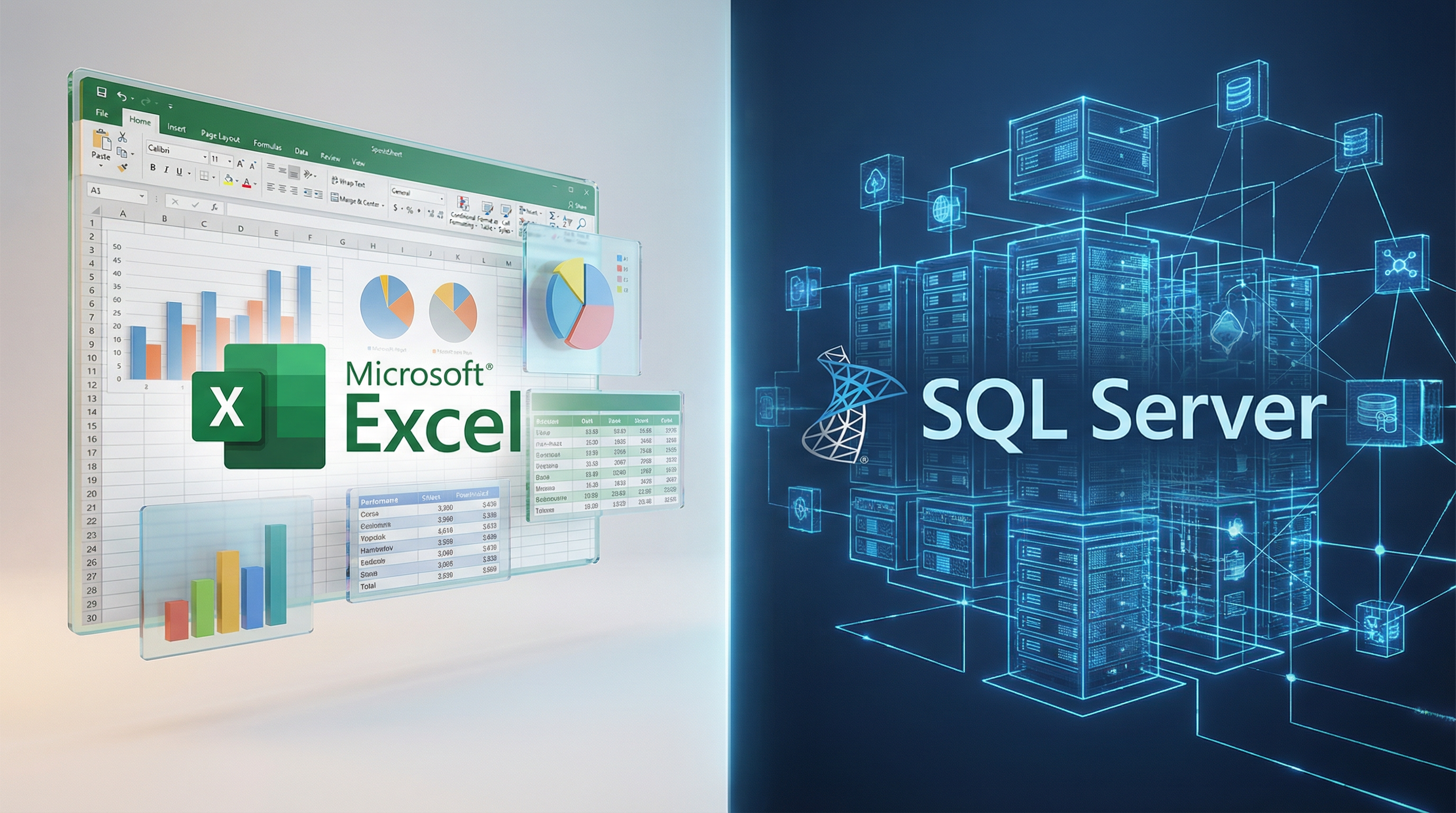
Excel vs SQL: Why Your Business Needs a Toolbox, Not Just One Tool
Explore the pros and cons of Excel vs SQL. Learn how to use both as a powerful data toolbox for better analytics, reporting, and business growth in 2026.
DATA ANALYTICS
Key Points
Excel serves as a front-end presentation layer while SQL functions as a back-end database engine.
Spreadsheets often face performance issues and formula errors when handling more than one million rows of data.
SQL provides superior security and allows multiple team members to edit data simultaneously without version conflicts.
Using SQL as a storage foundation helps maintain a single source of truth for your business reporting.
A hybrid workflow connects the power of a database to the familiar interface of a spreadsheet for flexible analysis.
Moving beyond basic spreadsheets is a critical step in digital transformation and successful ERP integration.
Actionable takeaway: Audit your most used spreadsheets to identify files that are slow or rely on manual entry and plan a transition to a SQL database for those specific datasets.
Data is the lifeblood of modern business. However, having data is not the same as knowing how to use it. Many business leaders find themselves caught in a common debate: Should we stick with the familiar comfort of Excel, or is it time to move to the power of SQL?
The truth is that these two are not enemies. They are actually partners. Most people know and love Excel because it is familiar and easy to use. It is customizable and lets you see your numbers instantly. On the other hand, SQL is a language designed to talk to databases. They serve different roles in your company.
To understand which one you need, you have to look at them as different layers of a house. One is the foundation (the back end), and the other is the beautiful interior design (the front end).
What are the pros and cons of using Microsoft Excel?
Why do teams love using spreadsheets for daily tasks?
Excel is arguably the most successful business software in history. According to recent data, over 750 million users globally rely on it for processing data.
The primary reason is its "what you see is what you get" nature. You can type a number, write a quick formula, and see the result immediately. It is highly flexible. Whether you are tracking a small inventory or building a complex financial model, Excel adapts to your needs without requiring a single line of code.
What are the biggest drawbacks of staying only on Excel?
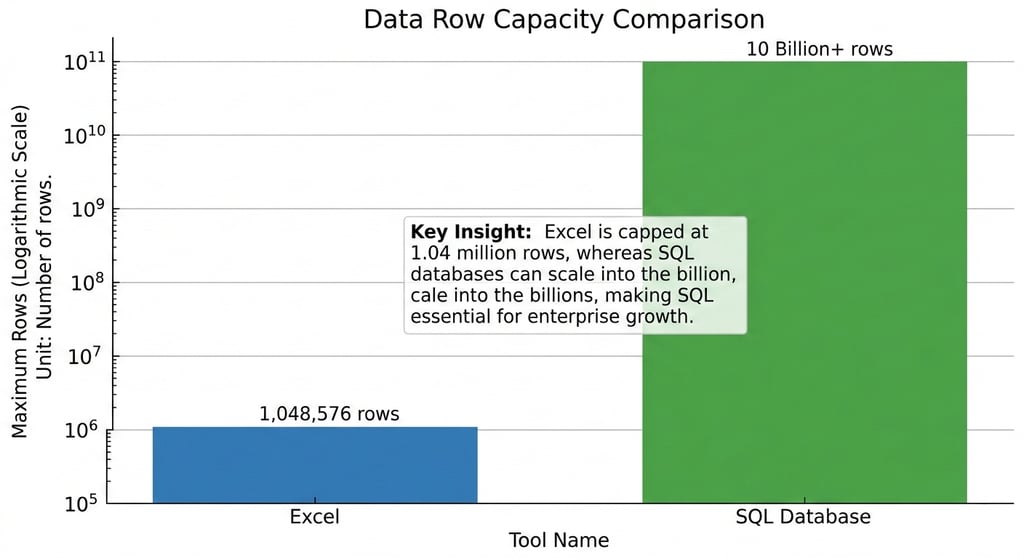
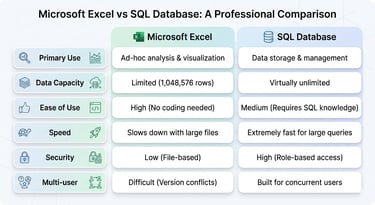
While Excel is great for quick math, it has serious limits. The most famous limit is the row count. A single Excel sheet can only hold 1,048,576 rows. While that sounds like a lot, a medium-sized retail business can hit that limit in months.
Performance is another issue. Once a spreadsheet gets too large, it becomes slow and prone to crashing. There is also the "human error" factor. Research shows that 88% of spreadsheets contain mistakes because of manual data entry or broken formulas. If one person accidentally deletes a cell, the whole report might be wrong.
What are the pros and cons of using SQL?
What makes SQL the engine behind large-scale data?
SQL stands for Structured Query Language. It is not a software program like Excel. Instead, it is the language used to interact with databases like MySQL, PostgreSQL, or SQL Server.
SQL is built for scale. While Excel struggles with a million rows, SQL databases can handle billions of rows with ease. It is also designed for multi-user collaboration. In Excel, if two people try to edit a file at the same time, you often get a "file in use" error or conflicting copies. In a SQL database, hundreds of people can read and write data simultaneously without any issues.
Why do some businesses hesitate to adopt SQL?
The biggest hurdle for SQL is the learning curve. You cannot just "open" SQL and start typing like a typewriter. You have to learn the syntax, such as "SELECT," "FROM," and "JOIN."
SQL also lacks a built-in "look." It is a back-end tool. If you run a SQL query, you get a table of raw data, not a colorful chart. To see your data visually, you usually need another tool on top of it, such as a business intelligence dashboard or even Excel itself.
Why is Excel called a presentation layer while SQL is a database?
Is Excel actually a database?
The short answer is no. A common saying among data experts is: "Excel is not a database. SQL is a database."
Excel is what we call a presentation layer. It is a tool for analytics, reporting, and visualization. It is the "front end" that the user interacts with to see charts and graphs. SQL, however, is the back end. It is the storage engine.
Think of it like a restaurant. SQL is the kitchen where all the raw ingredients are stored and prepped. Excel is the dining table where the finished meal is served. You wouldn't want to eat in the kitchen, and you can't cook a 5-course meal on a dining table. You need both to have a successful dinner.
What does it mean that SQL is a language for databases?
When people ask if they should use SQL, what they are really asking is whether they need a database. SQL is just the telephone you use to call the database and ask for information.
Using SQL allows you to pull specific pieces of information from a massive pile. For example, you can tell the database: "Show me all customers from Egypt who spent more than $500 in January." SQL finds that answer in milliseconds. In Excel, you would have to download the whole file, filter it manually, and hope your computer doesn't freeze.
How do Excel and SQL handle data security and accuracy differently?
How can Excel lead to accidental data loss?
In Excel, the data and the logic (the formulas) live in the same place. This is dangerous. Anyone with access to the file can change a formula or delete a row by accident. Version control is also a nightmare. We have all seen files named "Sales_Report_Final_v2_REALLY_FINAL.xlsx." When everyone has their own version of the truth, the business suffers.
How does SQL keep data clean?
SQL databases use something called "constraints." You can set rules that say: "This column must always be a date," or "This price cannot be a negative number." This prevents bad data from entering the system in the first place.
Additionally, SQL offers robust security. You can give a manager permission to see everything, while a junior clerk might only be allowed to see specific rows. This level of control is simply not possible in a standard spreadsheet.
When should your business use both tools together?
Can you connect Excel to a SQL database?
Yes, and this is where the magic happens. Many of our clients come to us for business intelligence projects and specifically ask for an "Export to Excel" feature. Even when we build high-tech dashboards, people still love the familiar and easy-to-use interface of a spreadsheet.
The best workflow is a hybrid one:
SQL stores and cleans the massive amounts of raw data.
Excel connects to that SQL database to pull only the summary data.
The User uses Excel to build quick "what-if" models or custom reports for a meeting.
What does a hybrid data toolbox look like?
Your toolbox should have many tools, not just one. A modern company often integrates their ERP or CRM data into a SQL database. Then, they use Business Intelligence (BI) tools to create live dashboards. Finally, they keep Excel for ad-hoc analysis.
This approach gives you the best of both worlds: the "one source of truth" from a database and the flexibility of a spreadsheet. Organizations that empower their employees with these tools see a revenue increase of more than 10% more often than those who gatekeep data.
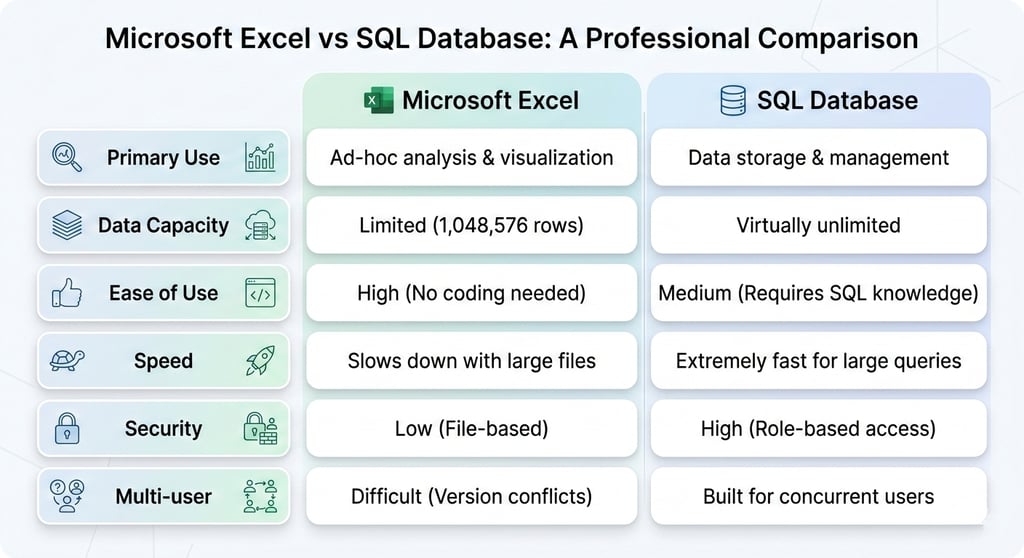
Summary: Excel vs SQL at a Glance
How Exology Helps
Choosing between Excel and SQL does not have to be a struggle. At Exology, we specialize in building the perfect "data toolbox" for your specific needs. We help you bridge the gap between back-end power and front-end familiarity.
Integrated Solutions: We connect your SQL databases directly to Excel, Power BI, or custom dashboards, ensuring you always have an "Export to Excel" option for the tools you love.
ERP and CRM Integration: We seamlessly integrate data from Odoo, Salesforce, SAP, and other platforms into a single source of truth using robust SQL architectures.
Scale and Performance: In 2025 alone, Exology has processed over 10M+ data rows, proving our ability to handle high-volume data without sacrificing speed.
Expert Guidance: Our team of 5 professional consultants has delivered over 150 projects worldwide, helping companies in Egypt, the MENA region, and internationally modernize their operations.
Proven Impact: We don't just organize data; we drive results. In one instance, Exology saved a client $130k in a single day by identifying inefficiencies through advanced data analytics and visualization.
We help you turn information into action. Whether you need a simple reporting fix or a full digital transformation, we have the tools and the expertise to make it happen.
Read More
Contact us
Whether you have a request, a query, or want to work with us, use the form below to get in touch with our team.