
How to Use LLMs to Enhance Business Intelligence Solutions
Learn how LLMs improve business intelligence with conversational BI, agentic BI, and practical ecosystem integrations that help teams act faster.
AI & AUTOMATION
Key Points
LLMs enhance business intelligence by making data easier to explore, understand, and act on through natural language.
Conversational BI allows users to ask questions about data in plain language instead of building reports manually.
Agentic BI goes beyond answering questions by helping users take actions and automate parts of decision-making workflows.
Strong data foundations, governance, and semantic models are essential for accurate and trustworthy AI-powered insights.
Platforms such as Power BI with Copilot, Looker with Gemini, and Microsoft Fabric Data Agents are bringing LLM capabilities directly into BI environments.
Businesses should focus on data quality, explainability, user adoption, and governance when implementing LLMs in BI.
Actionable takeaway: Start with a well-defined business question, connect your LLM to trusted data sources, and deploy a conversational BI use case before expanding to more advanced agentic workflows.
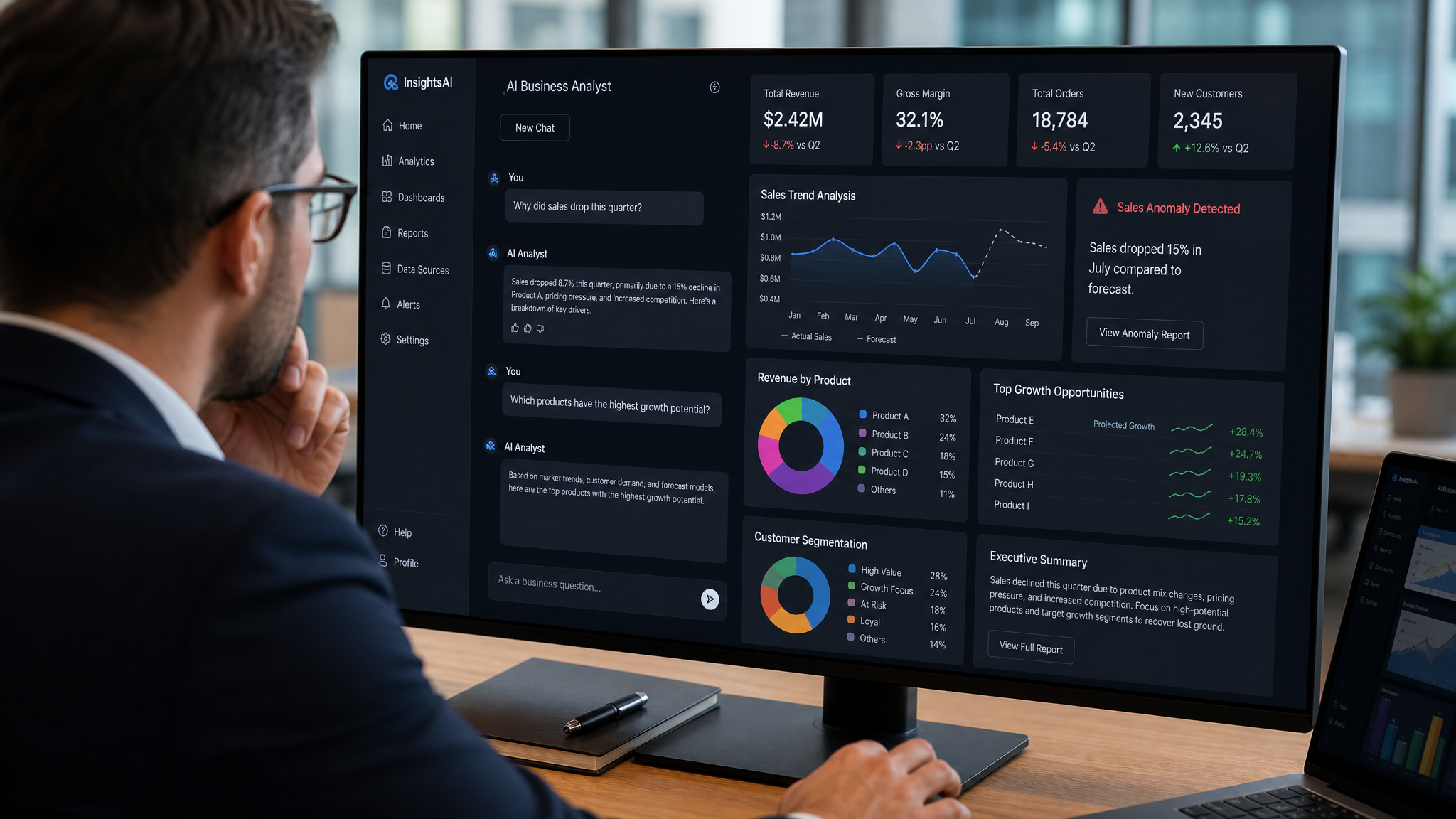
Business intelligence has always been about turning data into decisions. The problem is that many teams still spend too much time asking for reports, cleaning up definitions, and trying to understand what the dashboard is really saying. LLMs in Business Intelligence change that by making BI easier to talk to, easier to explore, and easier to act on.
The timing matters. McKinsey’s 2024 State of AI survey found that 65 percent of respondents said their organizations were regularly using gen AI. In McKinsey’s 2025 State of AI survey, that figure rose to more than three quarters of respondents using AI in at least one business function. McKinsey also reported that explainability and inaccuracy remain major concerns, which is exactly why BI teams need governed data and clear business logic, not just a chatbot on top of raw data.
What role do LLMs play in modern BI?
LLMs do not replace business intelligence. They make it easier to use. A BI platform still needs clean data, defined metrics, and governance. The LLM sits on top and helps people ask questions in plain language, summarize what matters, and move faster from data to decision. Microsoft describes Copilot for Power BI as a chat-based experience that can help with on the fly analysis for business users and DAX generation for advanced creators.
That is why the best BI use cases for LLMs are not flashy demos. They are about reducing friction. Instead of making a user learn a tool, a query language, or a complex dashboard path, the system can answer the question directly, then explain the result in simple terms. Microsoft’s newer Copilot in Power BI integration overview also shows that Copilot can generate report pages and explain DAX concepts, which makes BI feel less like a specialist task and more like a business conversation.
What is conversational BI?
Conversational BI means people can ask data questions the way they speak to a colleague. They can type, “Why did revenue drop in Q2?” or “Show me the top regions by margin last month,” and get a response without building a report from scratch. That matters because many business users do not think in charts first. They think in questions.
Google’s Conversational Analytics in Looker overview says conversational analytics uses Gemini for Google Cloud to interpret natural language questions and answer them in Looker based on your data. It also uses the Looker semantic model, meaning the LookML definitions, as the source of truth so responses stay accurate and consistent. That is the real value of conversational BI. It makes data easier to reach, but it still grounds answers in governed business logic.
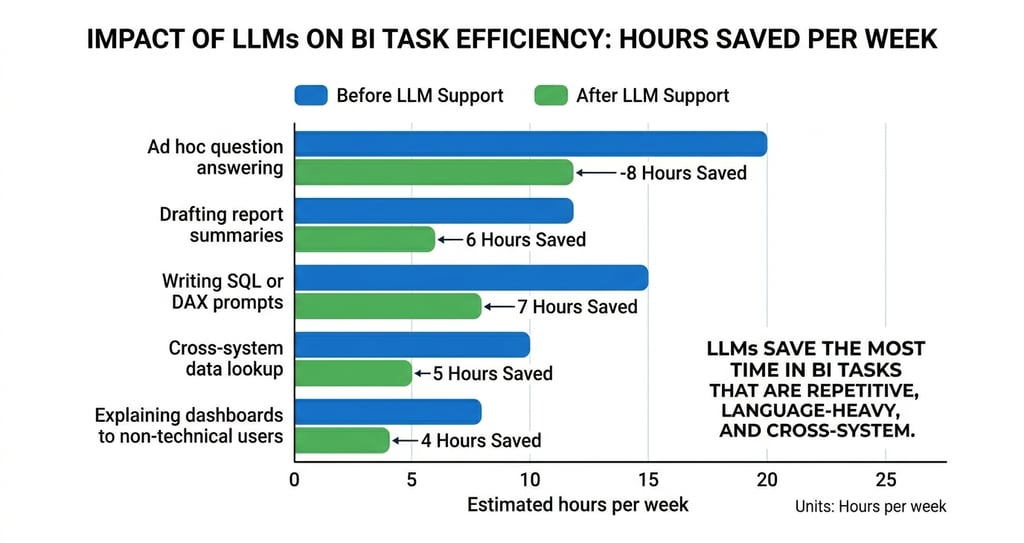
In practice, conversational BI helps two groups at once. Business users get faster answers. Analysts get fewer repetitive requests. That gives analysts more time for deeper work like root cause analysis, scenario review, and KPI design. Microsoft is also steering users toward Copilot for Power BI, noting that Power BI Q&A is being deprecated in December 2026 and recommending Copilot as the more advanced and integrated option for natural language queries.
What is agentic BI?
Agentic BI goes one step further than conversation. It does not just answer a question. It can help choose the right source, use the right tool, and complete the next step in a workflow. In other words, it moves from insight to action.
That idea is showing up across official BI platforms. Microsoft says the Fabric data agent enables conversational Q&A over data in Fabric OneLake and is now generally available. Microsoft also says you can create conversational AI experiences that answer questions about data stored in lakehouses, warehouses, Power BI semantic models, KQL databases, ontologies, and Microsoft Graph in Fabric.
Tableau’s official agentic analytics page describes the same direction from another angle, where humans and AI agents work together so analysis becomes more automated, proactive, and personalized. The common thread is simple. BI is no longer just about reading data. It is becoming a system that can help interpret and act on it.
Why LLMs in Business Intelligence need strong data foundations
LLMs work best when they are connected to the systems a business already uses. That means ERP data, CRM data, spreadsheets, cloud warehouses, semantic models, and internal documents should all be part of the design. If the LLM sits outside the ecosystem, it becomes a chatbot with limited context. If it sits inside the ecosystem, it becomes a practical interface for work.
Microsoft’s Knowledge sources summary says Copilot Studio agents can use enterprise data from Power Platform, Dynamics 365 data, websites, and external systems. Microsoft’s Copilot connectors documentation adds that connectors can index external enterprise data into Microsoft Graph while respecting source level permissions. That matters because enterprise AI should be grounded in controlled business systems, not left to guess from disconnected content.
Looker’s semantic layer gives the same lesson from a different angle. Google says the semantic model acts as a source of truth for metrics and business definitions. That matters because LLMs can only be as useful as the logic they are grounded in. If one team defines revenue one way and another team defines it differently, the LLM will simply make the confusion faster. If the semantic layer is clean, the LLM can make the whole BI experience more reliable.
Which BI platforms already use LLMs well?
Power BI with Copilot
Microsoft’s Copilot for Power BI overview shows how LLMs can live inside a familiar BI workflow. Copilot supports chat-based experiences, on the fly analysis, and DAX generation. That means users can ask for help in natural language, while advanced creators still keep the structure and control of a formal BI model. Microsoft also says model owners should prepare their data for AI, because without that prep, responses can become generic, inaccurate, or misleading.
Looker with Gemini
Google’s Conversational Analytics in Looker overview and Gemini in Looker overview show a similar pattern. Users can ask questions in conversational language, get charts or tables back, and rely on LookML to keep definitions consistent. This is a strong model for companies that want AI access to data without losing governance.
Fabric data agents and Copilot Studio
Microsoft’s Fabric data agent makes the agentic idea more concrete. It lets teams ask natural language questions about data in OneLake and receive relevant answers. Microsoft’s Copilot Studio knowledge sources and connector documentation then extend that pattern to enterprise and external systems. Together, these tools show what a modern BI ecosystem can look like when conversation, governance, and integration sit in the same architecture.
What other BI tools are moving in the same direction
The market is moving in the same direction across vendors. The message is consistent. Users want less time building queries and more time using answers. Agents, semantic layers, and connectors are becoming the new BI interface. Microsoft’s Power BI MCP server overview is another sign of that shift, because it says the remote MCP server can generate and execute DAX queries using Copilot’s intelligence, enabling natural language conversations with your data.
What should businesses watch out for?
The first issue is data quality. LLMs do not fix messy data. They expose it faster. If your metrics are inconsistent, your source systems are disconnected, or your definitions are weak, the model will not magically clean that up. Microsoft is explicit that data needs to be prepared for AI so the system understands business context and returns reliable responses.
The second issue is explainability. McKinsey found that explainability is one of the major risks companies see in gen AI, and only a small share of organizations are actively working to mitigate those risks. In BI, a number without a reason is not useful for decision-making. Teams need to know where an answer came from, which metric definition was used, and what data source supported it.
The third issue is adoption. A smart system still fails if people do not trust it or do not know how to use it. This is why training matters. BI teams should not only deploy an LLM layer. They should also teach users how to ask better questions, when to trust the summary, and when to dig deeper into the underlying report. McKinsey’s 2025 survey also shows that organizations are redesigning workflows and elevating governance as they deploy gen AI, which reinforces the point that adoption is as much about process as it is about software.
What does a practical LLM-enabled BI stack look like?
A practical stack starts with connected data sources. That can include ERP, CRM, spreadsheets, databases, cloud apps, and operational systems. The next layer is the semantic model, which defines the numbers and the business rules. After that comes the LLM layer, which handles natural language, summarization, and guided exploration. The last layer is the action layer, where the system can trigger workflows, route follow-up tasks, or hand off to an analyst when needed. This architecture is not theoretical. It is the direction current Microsoft and Google BI products are already moving toward.
How should a team start?
The best first use case is usually not the hardest one. Start with a question the business asks every week. That could be sales performance, pipeline movement, inventory changes, customer churn, or finance variance. Pick one area where the data is already available and the definitions are already known.
Then build the first version around three rules. First, ground the LLM in a governed data model. Second, limit it to approved sources. Third, make the output easy to verify. That approach keeps the system useful without overpromising what it can do. It also makes user trust much easier to build.
A good rollout should teach people what the LLM is for, and what it is not for. It is good at finding, summarizing, and explaining. It is not a replacement for governance, judgment, or business context. The most successful BI teams will use it to shorten the path from question to answer, then keep humans in control of the final decision. McKinsey’s 2025 survey shows that organizations getting value from gen AI are redesigning workflows and assigning senior leadership to governance, which is a useful model for any BI team starting this journey.
How Exology Helps
Exology has extensive experience in BI and data analytics, and with the rise of AI, we now also deliver AI and automation projects. We have completed 200+ projects for 150+ businesses across 20+ countries in 10+ key industries.
We help businesses connect data from multiple systems into one governed BI view, so LLMs can answer questions from a single trusted source instead of scattered files and dashboards.
We build conversational BI experiences that let teams ask for answers in plain language, then turn those answers into clear business actions.
We design agentic workflows that can summarize reports, surface anomalies, and route the next step to the right team faster.
We integrate BI with the wider business ecosystem, including CRMs, ERPs, spreadsheets, and cloud tools, so AI works with real operational data.
We train teams to use data and AI with confidence, so the solution is actually adopted, not just installed.
Read More
Contact us
Whether you have a request, a query, or want to work with us, use the form below to get in touch with our team.