

Why Companies Still Build Custom Business Software in the SaaS Era
Learn why companies still build custom business software in a SaaS-heavy world, and when a tailored system is the smarter choice.
BUSINESS APPLICATIONS
Key Points
SaaS tools work well for standard business processes that need fast setup and lower upfront cost.
Companies often build custom business software when workflows become too specific for generic tools.
Manual workarounds, disconnected systems, and heavy Excel usage are strong signs that existing software is no longer enough.
Custom software is commonly used for budget control, approvals, operational tracking, and structured data entry.
The best custom systems focus on solving one operational problem clearly instead of adding unnecessary complexity.
AI, automation, and reporting systems work better when business data and workflows are connected properly.
Actionable takeaway: Review your current workflows and identify where manual work, repeated errors, or disconnected tools are slowing down operations.
SaaS is everywhere now. There is a ready-made tool for almost every business function, from approvals and data entry to reporting and automation. That is exactly why many leaders ask a fair question before starting a new project: if software already exists for so many use cases, why would a company still build custom business software?
The answer is not that custom software is always better. The answer is that some business processes are too specific for a generic tool to handle well. When that happens, the business does not need another subscription. It needs a system that matches how the company actually works.
That question matters more today because software stacks keep growing. Flexera reports that organizations use over 400 SaaS applications on average, spend about $1,040 per employee each year on SaaS, and IT is aware of only about one third of those apps. Flexera also says 84% of organizations struggle to manage cloud spend. In other words, the SaaS era solved one problem, then created another one around sprawl, visibility, and control.
SaaS Is Everywhere, So Why Does This Question Still Matter?
Why SaaS became the default choice
SaaS became popular for simple reasons. It is fast to launch, easy to buy, and often cheaper than building from scratch. For a standard process, that is a huge advantage. A company can test a tool, train the team, and start using it with very little friction.
That is why SaaS is usually the first answer when a business needs software. It works well when the process is common and the requirements are clear.
Why the question of custom software still comes up
The question still comes up because real businesses are rarely perfectly standard. Two companies can buy the same tool and still use it in very different ways. Eventually, the process becomes more specific than the software.
That is when leaders begin to notice the gap. They are not asking for custom software because they want something complex. They are asking because their current process no longer fits inside a generic product.
What SaaS Does Well, and Where It Starts to Break Down
Fast setup and lower upfront effort
SaaS is great when speed matters. It removes a lot of the work that comes with a custom build. There is no need to design every screen, define every data field, or write every rule from zero.
That is useful for standard workflows. It is also useful when a company is still learning what it needs and does not want to commit too early to a heavy build.
Where generic tools begin to strain
The weakness of SaaS shows up when the business has too many exceptions. A budget control system, for example, may need different rules depending on department, project type, amount, or approval level. A data entry tool may need different validation logic for different teams or branches. A generic platform can often support part of this, but not always in a clean way.
IBM explains that business rules guide everyday decision-making and can be built into software logic to automate process decisions. IBM also notes that without these rules, updates become more time-consuming and documents are more exposed to human error and inconsistency.
Why workarounds are a warning sign
When people start exporting data to Excel, duplicating entries, or asking for manual approvals outside the main system, that is usually a sign that the software no longer fits the workflow. Workarounds can keep the business moving for a while, but they also hide problems.
Over time, workarounds become part of the process. That is when the company is no longer using the software it bought. It is managing around it.
Why Companies Still Build Custom Business Software
When the process is too specific for a generic tool
This is the most common reason companies still build custom business software. Their workflow is not broken. It is just different.
A budget control system is a good example. A business may want approvals to depend on amount, department, cost center, or project stage. A standard SaaS tool may handle some of this, but custom software can encode the exact rules the business uses every day.
When business rules need to be built into the system
The stronger the rule set, the more useful custom software becomes. Business rules are not just policy documents. They are the logic that decides what happens next. If the company has unique thresholds, approval chains, or validation steps, software can enforce those rules automatically and consistently. IBM’s documentation also shows that business rules can reduce error and improve consistency when they are built into workflow systems.
When software should reflect operations, not replace them
Good custom software does not force the business to change into something it is not. It supports the way the business already operates, then makes that operation cleaner, faster, and easier to track.
That is why many custom systems are not huge platforms. They are often simple internal tools built around one important process, such as budget control, approvals, data entry, or operational tracking.
Exology sees this pattern often. We have completed 200+ projects for 150+ businesses across 20+ countries in 10+ key industries, and one lesson shows up again and again. Companies ask for custom software when their actual workflow no longer fits inside a standard tool.
What Problems Usually Signal That a Business Needs Custom Software?
Budget control and approval logic
Budget control is one of the clearest examples of where custom software makes sense. Many organizations need approval rules that are tied to thresholds, departments, or project types. That is a business logic problem as much as a software problem.
If leaders need to know who approved what, when it happened, and why the request was accepted or rejected, a custom system can make that trail much clearer.
Data entry and validation
Data entry is another common case. Many companies do not need a complex platform. They need a better way to collect clean information the first time.
That means validation rules, structured forms, role-based access, and fewer manual corrections later. A generic form tool may work for simple capture. A custom application works better when the business needs accuracy and structure built into the process.
Disconnected systems and duplicate work
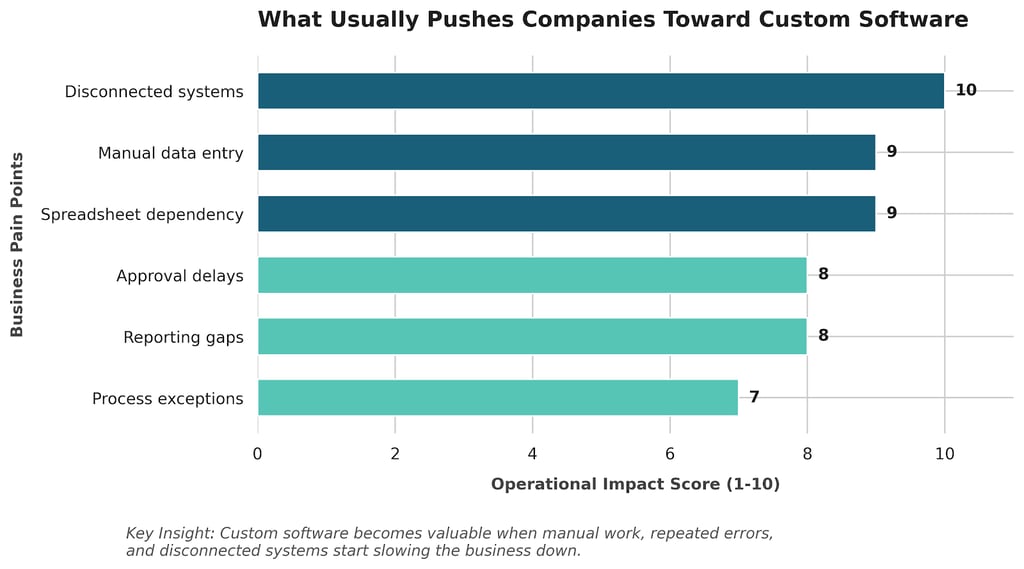
One of the biggest signs that custom software is needed is when data lives in too many places. Teams pull numbers from spreadsheets, paste them into reports, and then re-enter the same information into another system. That creates delays and introduces errors.
MuleSoft’s API guidance is helpful here because it explains that APIs are the mechanism that allows systems to talk to each other and exchange data. If a company depends on several tools that do not connect well, then integration becomes part of the operating model, not just a technical detail.
Reporting gaps and manual Excel work
If leaders cannot see what is happening without asking someone to prepare a manual update, the software stack is not giving enough visibility. This is one of the most common reasons companies move from spreadsheets and off-the-shelf tools to custom systems.
A custom application can capture the right data at the right step, then turn it into a live view for operations, finance, sales, or management.
What Types of Custom Software Do Businesses Actually Build?
Budget control systems
Budget control systems help companies approve spending based on real rules, not informal email chains. They can show available budget, request history, approval status, and exceptions in one place. That makes the process easier to manage and easier to audit.
Internal approval tools
Many businesses build approval tools for purchase requests, leave requests, vendor onboarding, content approvals, and operational sign-offs. These systems do not need to be complex. They just need to move the right request to the right person at the right time.
Data entry applications
Custom data entry apps are common when accuracy matters. These tools are often used for field data, internal operations, compliance records, or structured business inputs. The goal is not just to collect data. The goal is to collect better data.
Vendor and operations platforms
Companies also build vendor management systems, operations trackers, maintenance request apps, and internal service portals. These tools help teams coordinate work, reduce confusion, and keep everyone aligned around the same process.
When Is Off-the-Shelf Software Still the Better Choice?
When the process is standard
If the workflow is simple and widely used across the market, SaaS is often the better choice. There is no reason to custom-build something just because it can be built.
When speed matters more than customization
If the team needs to start quickly, or if the company is still testing the process, a ready-made tool is often the safest first move. It gets the business moving without a long development cycle.
When the business is still defining the workflow
Custom software works best when the process is already understood. If the company is still changing the workflow every week, building too early can create a system that is hard to maintain later.
That is why the best teams often start with a simple tool, learn from real usage, then decide whether the process has become unique enough to justify a custom build.
How to Decide Between SaaS and Custom Software
The questions leaders should ask
The decision gets easier when leaders ask direct questions. Is this process standard or unusual? Do we keep making manual workarounds? Are we losing time because systems do not connect? Do we need the software to enforce our rules, or just record them?
If the answer points toward high complexity, repeated exceptions, or poor integration, custom business software starts to look more justified.
Why low-code can be a middle path
Not every custom solution needs to be built in the most complex way. Microsoft’s Power Apps documentation says teams can quickly build low-code apps that modernize processes and solve tough business challenges. That makes low-code useful when a company wants a tailored workflow without starting from a completely blank slate.
When a full custom build becomes worth it
A full custom build becomes more valuable when the business needs deeper integration, more control over logic, or a better fit for complex internal operations. That is especially true when the system is part of day-to-day work, not just a side process.
What Makes Custom Software Worth the Investment?
Adoption
The best software is the software people actually use. If the system is confusing, heavy, or hard to trust, it will not solve the problem. A clean design and a clear workflow matter more than extra features.
Integration
Custom software should reduce fragmentation, not add to it. If it can connect to the company’s existing systems, the value goes up fast. That is especially important now that companies are trying to bring together data from many tools at once.
Visibility
One of the biggest benefits of custom software is visibility. When the right data is captured at the right moment, leaders can see what is happening without waiting for manual reports. That improves speed and confidence in decision-making.
Long-term fit
Good custom software keeps working as the business grows. The goal is not just to solve today’s problem. The goal is to build a system that stays useful as operations become more complex.
Why This Matters More Now Than It Did Before
SaaS sprawl and tool overload
The modern software stack can grow very quickly. Flexera’s research shows just how easy it is for SaaS sprawl to happen, especially when different teams buy tools independently and use them in isolation. That creates cost, complexity, and visibility issues at the same time.
AI and automation depend on clean integration
This is becoming even more important as companies use AI. MuleSoft’s 2026 Connectivity Benchmark Report says 96% of IT leaders agree that AI agent success depends on seamless integration across systems, 54% say they have centralized governance, and 50% of AI agents operate in isolation. That shows why connected systems and clean business logic matter more than ever.
Custom logic is becoming more valuable
As businesses add more tools, more automations, and more AI, they also need clearer logic behind the process. That is where custom software has a real advantage. It turns a messy workflow into a system that can be understood, managed, and improved.
How Exology Helps
We help businesses map the real workflow first, so the software is built around how teams actually approve, enter, and track work.
We build custom systems that connect data from spreadsheets, ERPs, CRMs, SQL databases, and cloud tools into one clear operating view.
We create dashboards and operational tools that make bottlenecks, delays, and exceptions easy to see in real time.
We automate repetitive steps so teams spend less time on manual work and more time on decisions.
We train teams to use the system confidently, so the software becomes part of daily operations instead of another tool people avoid.
Read More
Contact us
Whether you have a request, a query, or want to work with us, use the form below to get in touch with our team.